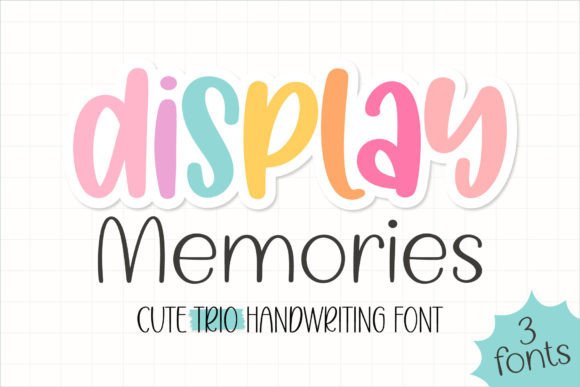
Display Memories: The Handwritten Font That Turns Everyday Projects Into Keepsakes
There’s something quietly magical about handwriting — the slight variation in stroke weight, the gentle tilt of letters, the warmth that no perfectly uniform typeface can replicate. Display Memories captures that magic with remarkable authenticity. It’s not just another script font; it’s a sweet and cute handwritten trio font designed to feel personal, intentional, and full of heart. Whether you’re crafting an invitation for your sister’s rustic-chic wedding or designing a cozy Instagram story for your small-batch candle shop, Display Memories adds charm without clutter, elegance without effort.
What Makes Display Memories Stand Out?
At first glance, Display Memories looks effortlessly charming — but its strength lies in thoughtful design details. It’s a trio font, meaning it includes three complementary styles: a primary flowing script, a clean supporting sans-serif, and a delicate decorative element set (like flourishes, hearts, or tiny stars). This built-in versatility means you don’t need to hunt for compatible fonts or overthink pairings. Everything works — right out of the box.
The script itself is soft-edged and slightly bouncy, with natural entry and exit strokes that mimic real pen-on-paper motion. Letters connect smoothly but never rigidly — there’s breathing room, personality, and variation. Unlike some overly ornate scripts that sacrifice readability, Display Memories maintains clarity even at smaller sizes, especially when used with its supporting sans-serif for body text or captions.
Wedding Invitations That Feel Like a Love Letter
Modern couples want their stationery to reflect intimacy, not formality. Display Memories delivers exactly that. Imagine “Mr. & Mrs. Thompson” in the elegant script, followed by crisp sans-serif details for date, time, and location — all on textured ivory paper. Add a single flourish beneath the couple’s names, and suddenly your invite isn’t just information — it’s a tactile memory waiting to happen. Designers love how easily Display Memories adapts to foil-stamped envelopes, digital RSVP cards, or printable save-the-dates — no extra font licenses needed.
Stationery Art That Builds Brand Warmth
Small business owners, especially in wellness, lifestyle, and handmade markets, rely heavily on visual tone. A greeting card line, a boutique tea brand, or a mindfulness journal publisher all benefit from typography that feels human and grounded. Display Memories helps those brands speak softly but memorably. Its handcrafted rhythm invites pause — whether it’s on a thank-you note tucked inside a package or a quote printed on a linen pouch. Because it’s not overly cutesy or childish, it scales beautifully from playful stickers to refined packaging labels.
Social Media Posts That Stop Scrolling
On fast-moving platforms like Instagram and Pinterest, authenticity cuts through noise. A flat-lay photo of a coffee cup beside a notebook with “Good morning, sunshine ☀️” in Display Memories feels more personal than generic sans-serif text. Its natural irregularities catch the eye — not because it’s flashy, but because it signals *real*. Designers use the trio format smartly: script for headlines, sans-serif for short descriptions, and decorative elements as subtle dividers or bullet points. Bonus? It renders cleanly across devices and remains legible even when scaled down for Stories.
How Display Memories Fits Into Real Creative Workflows
You don’t need advanced design skills to get great results with Display Memories. It works seamlessly in tools like Canva, Adobe Illustrator, Affinity Designer, and even Google Slides (when uploaded as a custom font). Its OpenType features include standard ligatures and alternate characters — so typing “love” might automatically swap in a prettier “ov” connection, adding polish without manual tweaking.
For designers using it in client work, licensing is refreshingly straightforward. Most versions include both personal and commercial use rights — meaning you can use it in client deliverables (logos, websites, print collateral) without needing additional permissions. Just double-check your specific license if you’re planning large-scale merchandise or app integration.
And yes — it’s beginner-friendly. If you’ve ever struggled with script fonts that look stiff or disconnected, Display Memories solves that with intuitive spacing and balanced letterforms. Try typing a short phrase in all caps for impact, or mix upper- and lowercase for a relaxed, conversational tone. It responds well to color too: try warm terracotta for autumnal themes, dusty rose for bridal palettes, or deep navy for timeless sophistication.
Practical Tips for Getting the Most From Display Memories
- Less is more with flourishes. Use decorative elements sparingly — one at the start of a headline, or as a subtle divider between sections. Overuse dilutes the charm.
- Pair intentionally. While the included sans-serif is perfectly matched, you can also pair Display Memories with other friendly, low-contrast sans-serifs like Poppins, Nunito, or Quicksand — just avoid anything too geometric or cold.
- Test readability early. Preview your design on mobile before finalizing. Script fonts can blur or pixelate if exported poorly — stick to high-resolution PNGs or SVGs for digital use, and 300 DPI TIFFs or PDF/X-4 for print.
- Think beyond English. While optimized for Latin-based languages, Display Memories supports basic accented characters (á, é, ñ, ü), making it suitable for bilingual wedding invites or multicultural branding — just verify glyph coverage in your version before committing to multilingual layouts.
Why Designers Keep Coming Back to Display Memories
In a world saturated with hyper-polished, algorithmically generated visuals, people are craving sincerity. Display Memories answers that need without leaning into nostalgia or gimmickry. It doesn’t pretend to be vintage — it simply feels handmade, kind, and present. That emotional resonance translates directly into engagement: guests remember invitations, customers linger on social posts, clients trust brands that communicate with warmth.
It’s also remarkably adaptable across seasons and trends. Used with sage green and cream, it evokes spring garden parties. Paired with burnt orange and charcoal, it anchors fall-themed content. In minimalist black-and-white, it becomes unexpectedly modern. That flexibility means Display Memories isn’t just a seasonal pick — it’s a long-term asset in your creative toolkit.
Choosing the Right Version for Your Needs
Most creators start with the standard desktop license — ideal for personal projects, small business branding, and freelance client work. If you’re building templates for sale on marketplaces like Creative Market or Etsy, look for the extended license, which permits redistribution. Some bundles also include bonus assets: matching watercolor textures, editable mockups, or even coordinating SVG cut files for Cricut and Silhouette users.
One thing to watch: free versions of Display Memories sometimes circulate online, but they often lack the full character set, OpenType features, or commercial rights. Investing in the official release ensures consistency, support, and ethical usage — plus, many creators offer quick email support if you run into technical hiccups during installation or use.
A Font With Quiet Confidence
Display Memories doesn’t shout. It doesn’t need to. Its power comes from precision, personality, and purpose — all wrapped in three thoughtfully crafted styles. Whether you're hand-lettering digitally for the first time or refining a decade-old brand identity, this font meets you where you are. It’s forgiving enough for experimentation, polished enough for professionalism, and tender enough to make people pause — and smile.
So next time you’re choosing a font for something meaningful — a vow book, a baby announcement, a heartfelt newsletter, or even just a note taped to your fridge — consider what it means to display memories. Not just with photos or mementos, but with type that carries feeling in every curve and line. That’s what Display Memories does best.