Watercolor
What Is Watercolor — and Why It’s Changing How Designers Work with Texture
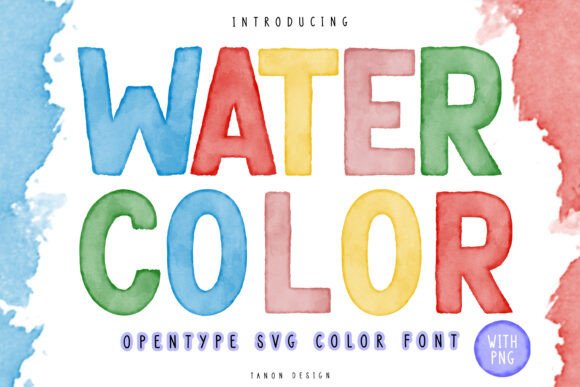
Watercolor isn’t just a painting medium anymore — it’s a dynamic, expressive digital font technology. At its core, Watercolor is an OpenType SVG Color font that simulates the organic, translucent quality of real watercolor brushstrokes. Unlike standard fonts that render as flat, solid shapes, Watercolor uses layered, semi-transparent color glyphs built from realistic watercolor textures. Each letter appears hand-painted: soft edges, subtle pigment bleed, delicate granulation, and gentle paper texture peeking through.
This isn’t a “watercolor-style” effect applied after typing — it’s baked into the font itself. When you type with Watercolor in compatible software, every character behaves like a physical watercolor stroke placed directly onto your background. That means if your design has a linen texture, a kraft paper scan, or even a marble surface, the text doesn’t sit *on top* — it visually integrates, allowing the underlying texture to show through naturally.
How Watercolor Works — Without Overcomplicating It
Watercolor relies on OpenType SVG Color, a modern font format that supports multi-color, vector-based glyphs with transparency and layering. Think of each letter as a tiny, self-contained watercolor painting — complete with pigment variation, wet-on-wet blending, and paper grain visibility.
To use the full interactive experience, you’ll need Photoshop CC 2017 or later or Illustrator CC 2018 or later. These versions support SVG Color fonts natively, letting you scale, recolor (within limits), and layer text without losing quality or texture fidelity.
But here’s the practical truth: not everyone uses professional design software — and that’s okay. The Watercolor collection includes five bonus sets of high-resolution, transparent PNG files — each at 1200 pixels tall (roughly 4 inches at 300 DPI for print). These are ready-to-use, no-software-required assets. Drop them into Canva, Cricut Design Space, Silhouette Studio, PowerPoint, or even social media templates. They retain the same authentic watercolor look — just without the live-editing flexibility of the SVG font.
Where Watercolor Fits in Real Projects
Because of its tactile realism and seamless texture integration, Watercolor excels where personality, warmth, and handmade charm matter most. Here’s where users consistently see strong results:
- T-shirt and apparel designs — Especially for boutique brands, small-batch collections, or seasonal campaigns. The font’s softness avoids harsh contrast, making prints feel approachable and artisanal.
- Mug and ceramic decals — Watercolor’s gentle opacity mimics how ink settles into glazed surfaces, avoiding the “sticker-like” appearance common with bold sans-serifs.
- Wedding stationery & greeting cards — From save-the-dates to thank-you notes, Watercolor adds elegance without formality. Its subtle imperfections evoke sincerity and care.
- Digital illustrations and social media graphics — Layered over hand-drawn backgrounds or scanned watercolor washes, it creates cohesive, unified visuals — no extra masking or blending needed.
- Craft kits and printable bundles — Educators, craft bloggers, and DIY creators use the PNGs for instant downloadables — labels, tags, banners, and classroom decor — all with consistent, print-ready quality.
Who Benefits Most from Watercolor?
Small business owners building brand identity often turn to Watercolor when they want to signal authenticity — think bakeries, florists, herbal apothecaries, or indie bookshops. It helps differentiate from generic stock fonts while staying legible and versatile.
Design professionals appreciate how Watercolor reduces production time. Instead of manually painting letters or layering textures over type, they get editable, scalable, and print-safe watercolor typography in one click — freeing up time for layout refinement or client collaboration.
Hobbyists and educators rely on the PNG files for quick, reliable results. Whether printing lesson plans, crafting holiday ornaments, or designing homeschool materials, Watercolor delivers professional polish without steep learning curves.
Strengths You’ll Notice Right Away
- Texture-aware rendering: Letters don’t flatten your background — they invite it in. This makes Watercolor uniquely effective on textured substrates (real or digital).
- Print-ready clarity: At 1200 px height, the PNGs hold crisp detail even when scaled down for business cards or up for wall art — no pixelation, no anti-aliasing artifacts.
- Consistent aesthetic across formats: Whether used as an SVG font in Illustrator or as a PNG in Canva, the visual voice remains unmistakably watercolor — supporting brand cohesion.
- No licensing surprises: Designed for commercial use, including resale items like POD t-shirts or digital downloads — no hidden restrictions or attribution requirements.
Things to Keep in Mind
While powerful, Watercolor isn’t meant to replace every font in your toolkit. Its strength lies in expressive, intentional moments — not dense body copy or data-heavy interfaces. For example:
- It’s not ideal for long paragraphs or small UI text (under 24 pt in most cases), where readability may soften due to texture complexity.
- SVG Color fonts won’t display correctly in older browsers, email clients, or basic word processors — but the PNG alternatives ensure broad compatibility where it matters most.
- Because each glyph contains layered raster-like information, file sizes are larger than standard OTF/TTF fonts — something to consider only if embedding in web projects (though most users apply it during design, not delivery).
Getting Started: Which Format Is Right for You?
Ask yourself two questions:
- Do I need to edit, resize, or recolor the text frequently within my design workflow? → Choose the OpenType SVG Color font. Use it in Photoshop or Illustrator to maintain full flexibility.
- Do I need fast, plug-and-play assets for templates, cutting machines, or platforms without SVG font support? → Go straight to the PNG sets. They’re pre-sized, transparent, and optimized for immediate use.
You don’t have to choose one or the other — many designers use both. Try the SVG font for mockups and final artwork, then export key phrases as PNGs for social posts or vendor uploads.
A Final Thought: Watercolor Isn’t Just About Looks
Typography shapes how people feel before they even read a word. Watercolor does more than mimic a medium — it signals intention. It says, “This was made with attention. With patience. With care.” In a world saturated with sharp edges and algorithmic perfection, that quiet authenticity resonates — whether you’re launching a new product line, designing a child’s birthday banner, or creating a heartfelt keepsake.
So whether you're sketching ideas on paper or refining vectors on screen, Watercolor gives you permission to embrace imperfection — and turn it into distinction.